Latest upgrade: Local area network connection, no USB data cable required to connect to computer.
Professional-grade iPhone centralized control and automation hardware platform
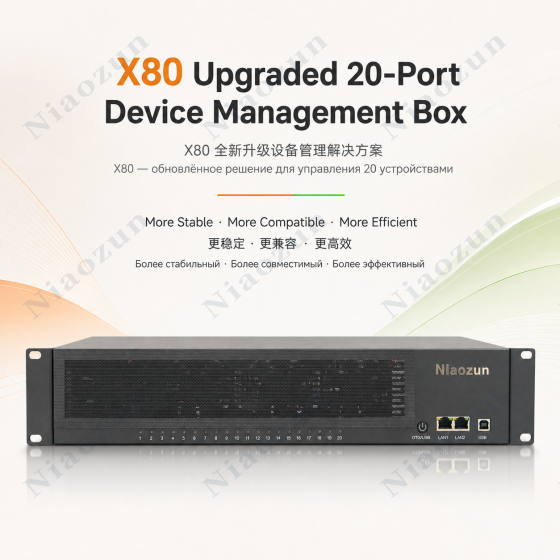
Niaozun iPhone Farm Box is a professional centralized iPhone management solution that integrates hardware, control software, and automation APIs.
The latest upgraded version adopts a local area network (LAN) control connection solution, eliminating the need to connect the Farm Box to a computer via a USB cable. Simply connect the device to the LAN, and you can use the accompanying computer software to achieve centralized control of your iPhone, screen mirroring, batch operations, and automated management.
From hardware integration to software control, from daily operation to program development, Niaozun provides users with a more complete and flexible iPhone Farm solution.
I. Latest Upgrade: Local Area Network Control Solution
Say goodbye to traditional USB computer connections and make device deployment simpler.
The new version upgrades the device control connection method, eliminating the need to connect to a computer via USB data cable for control.
Simply connect the Farm Box to the local area network and complete the network configuration according to the tutorial, and you can connect to and manage the device through the accompanying software on your computer.
Upgrade advantages:
Control via computer without USB cable
Connecting devices and computers via LAN (Local Area Network)
Reduce the complexity of USB wiring and cabling on the computer.
The equipment deployment is more organized
Convenient centralized management of multiple devices
Provides network connectivity for automated control and program development
This upgrades iPhone Farm from a traditional wired connection to a more flexible networked control solution.
II. Regarding iPhone Farm: No jailbreaking, no installation of mobile apps
No jailbreaking or installing a control app on your iPhone is required.
Niaozun iPhone Farm's accompanying control solution supports centralized control of iPhone devices without jailbreaking or installing additional control apps.
Using computer-based screen mirroring control software, users can view and operate connected iPhones on their computers, enabling centralized management of multiple devices.
Computer-based control functions:
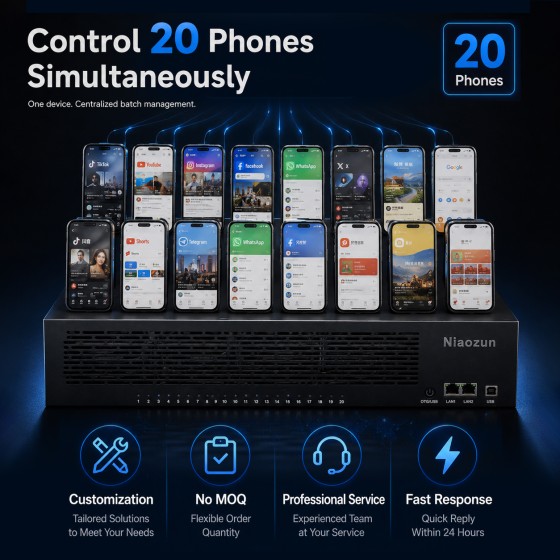
Centralized management of multiple iPhones
Real-time screen mirroring
Real-time keyboard input
Mouse operation, supports smooth clicking
Copy and paste
File transfer
Batch operation of multiple devices
Touch operations such as clicking and swiping
Simulated keyboard input
There's no need to pick up your phone to operate each device; you can manage multiple devices directly through your computer.
III. Powerful Automation API Interface
Not only can it be controlled manually, but it also supports developers in writing their own automation programs.
Niaozun software offers a rich set of open automation APIs, making it easy for developers to integrate iPhone control capabilities into their own programs, scripts, and automated workflows.
WebSocket interface
Simulated click
Simulated sliding
Simulated keyboard input
Image search
Color Search
OCR (Optical Character Recognition)
Perform operations by directly calling the hardware through the program.
Developers can write scripts according to their own needs to achieve more flexible device control and automated processes.
Whether it's basic operations or complex automated tasks, they can all be extended through open interfaces.
IV. Software Compatibility and Resource Usage
Wide range of iPhone models supported
Supported control software:
iPhone 6s and later models
iOS 14 and above
Specific compatibility depends on the actual device model, system version, and software version.
Software Download
Official download link for the accompanying software:
It is recommended to read the user guide and API documentation before purchasing to understand the software features and device configuration requirements.
V. Purchase hardware and receive a free one-year VIP software membership.
Hardware and software used together reduce initial operating costs.
Purchase the Niaozun iPhone Farm Box and receive a free 1-year VIP membership to the accompanying software.
Purchase a machine and receive a free 1-year VIP membership.
VIP renewal price: $200/year
Membership can be renewed upon expiration based on actual usage needs.
Specific membership benefits, activation methods, and authorization scope are subject to the actual order and software authorization rules.
VI. Professional hardware design to create a stable equipment management platform
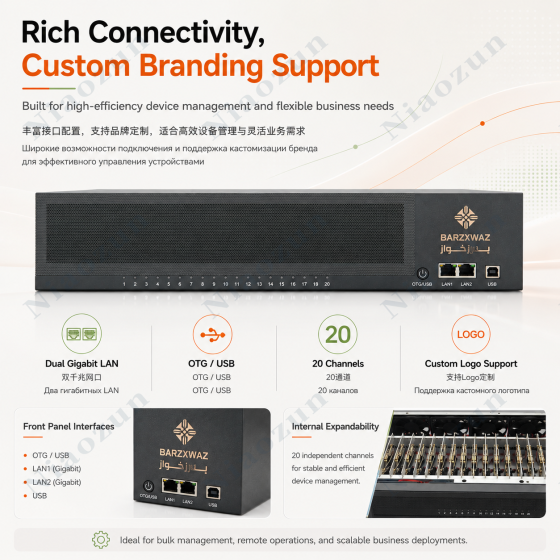
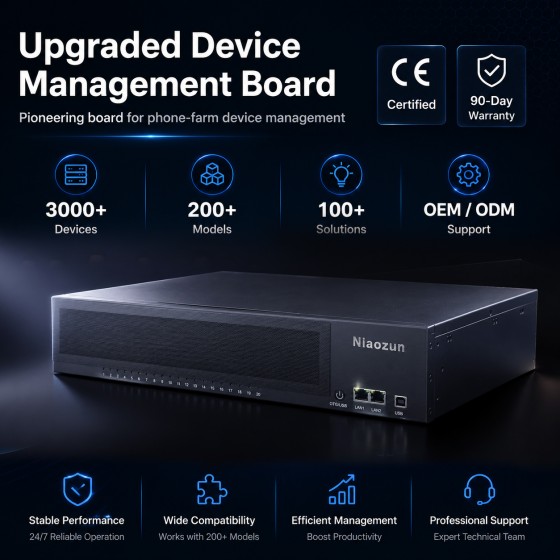
The device adopts a metal chassis structure, integrating the equipment connection module, power supply components, internal wiring, and heat dissipation system.
Hardware design features:
Metal chassis structure
Integrated internal connectivity architecture
Independent equipment installation and connection location
Neat internal wiring layout
Front-end device status indication area
Integrated control buttons, network, and USB interface
The integrated hardware design makes device deployment, connection, and maintenance more convenient.
Seven- or eight-fan cooling system
Multi-fan coordinated cooling optimizes airflow inside the chassis.
The equipment adopts a layout design with 8 cooling fans. The fans at the front and rear of the chassis work together to help the internal airflow and improve the heat dissipation environment when multiple devices are running at the same time.
8 Fan Cooling Layout
Front and rear air duct design
Aids in the dissipation of internal heat
Chassis structure suitable for centralized deployment of multiple devices
VIII. Integrated Power Supply System
Simplify the power supply structure and reduce the complexity of external connections.
The equipment adopts an integrated power supply design, which reduces the complicated power supply wiring when deploying multiple devices.
Power supply parameters:
Input voltage: 110V–220V
Power supply: 450–550W
Output voltage: 5V
Adaptive power supply design
In actual use, please confirm the power supply requirements according to local power standards and equipment configuration.
Purchase Notice: Please read carefully before placing an order.
This product is specialized equipment; please ensure you have the necessary installation and configuration skills.
iPhone Farm involves hardware connection, network configuration, software installation, and device debugging, and the entire deployment process has certain technical requirements.
Regarding the empty box version:
If you are purchasing an empty iPhone Farm box or a version that requires self-assembly and configuration, please make sure you have strong hands-on skills and basic technical knowledge.
The empty box requires users to complete the relevant settings and debugging themselves. Due to differences in individual operating skills, network environment, and configuration methods, installation or setup problems may occur.
Refund and after-sales service instructions:
Please fully understand the product configuration and usage requirements before purchasing.
The empty box version is not suitable for users who lack relevant technical experience and want to use it out of the box.
If the product cannot be used normally due to problems with the buyer's own installation, configuration, or operation, it is not a valid reason for a no-reason refund.
If you encounter any quality issues with the product itself, please apply for processing in accordance with the product warranty and after-sales policy.
If you have any questions before purchasing, please contact Niaozun technical staff for confirmation to avoid affecting the use of the product due to configuration issues after purchase.
Why choose Niaozun?
We not only provide hardware, but also a complete iPhone Farm hardware and software solution.
Next-generation LAN control solution
No USB cable required to connect to computer
No need to jailbreak your iPhone or install a control app
Centralized control of multiple devices on computer
Rich automation API interfaces
Image search, color search, and OCR
Purchase the machine and receive a free 1-year VIP software membership.
Professional technical support and after-sales guarantee
Niaozun — Focused on iPhone Farm hardware and software solutions.
Make device connectivity simpler, centralized control more efficient, and automation development more flexible.
2U box
Integrated functions
USB + OTG
Integration quantity
21
Fixed mode
Integrated bracket
Cooling mode
8 fans
110V-220V Connect 5V output Power Supply
450-550W Self-Adapting
Shell material
Metal
1. After-sales warranty for mobile phone farm equipment
Niaozun farm equipment is manufactured using recycled old mobile phones from the market. It undergoes strict screening and testing during the process, and free repair and replacement of parts are provided for any damage during the warranty period.
2. After-sales warranty period
The mobile farm box has a 12-month warranty, the mobile farm motherboard has a 3-month warranty, and other peripheral products have a 6-month warranty (such as PCs, network equipment, phone stands, etc.).
3. Warranty Notes
Do not disable USB debugging and developer mode during use. Do not modify the device yourself, such as by performing factory reset, system upgrade, system modification, or system patching. Such actions will void the after-sales warranty.
4. After-sales transportation costs
During the warranty period, the after-sales shipping costs will be borne by our store. Buyers need to patiently cooperate with customer service to provide guidance on product verification, testing, and repair; otherwise, the store has the right to refuse after-sales service.
5. Regarding returns and refunds
The equipment is a customized product and does not support unconditional refunds. If you are unable to receive the goods due to reasons attributable to the online store, you can get a refund. If the received goods are faulty, you can apply for after-sales service, and our service personnel will provide comprehensive after-sales guidance.
6. If you encounter any problems during the use of the machine, please contact Birdzun at any time. We offer free remote assistance. Please ensure you comply with local laws and regulations when using this equipment. We assume no responsibility for any issues arising from such use.
1. After-sales warranty for mobile phone farm equipment
Niaozun farm equipment is manufactured using recycled old mobile phones from the market. It undergoes strict screening and testing during the process, and free repair and replacement of parts are provided for any damage during the warranty period.
2. After-sales warranty period
The mobile farm box has a 12-month warranty, the mobile farm motherboard has a 3-month warranty, and other peripheral products have a 6-month warranty (such as PCs, network equipment, phone stands, etc.).
3. Warranty Notes
Do not disable USB debugging and developer mode during use. Do not modify the device yourself, such as by performing factory reset, system upgrade, system modification, or system patching. Such actions will void the after-sales warranty.
4. After-sales transportation costs
During the warranty period, the after-sales shipping costs will be borne by our store. Buyers need to patiently cooperate with customer service to provide guidance on product verification, testing, and repair; otherwise, the store has the right to refuse after-sales service.
5. Regarding returns and refunds
The equipment is a customized product and does not support unconditional refunds. If you are unable to receive the goods due to reasons attributable to the online store, you can get a refund. If the received goods are faulty, you can apply for after-sales service, and our service personnel will provide comprehensive after-sales guidance.
6. If you encounter any problems during the use of the machine, please contact Birdzun at any time. We offer free remote assistance. Please ensure you comply with local laws and regulations when using this equipment. We assume no responsibility for any issues arising from such use.




-560x560.png)
-560x560.png)